RVault Box RVault Box

How to Know If a WiFi Smart Safe Is Worth It in 2026?

Time:2026-11-08 Author:Oliver
0%

A WiFi smart safe can send alerts, show access history, and let you check its status from a phone. Those features sound useful when you are away from home. But a connected safe is not automatically a stronger safe, and a notification cannot replace a sound lock, solid construction, or sensible placement. Are smart safes with Wi-Fi worth the investment? The answer depends on what you store, how often you need remote updates, and whether the extra features work reliably in your space.

Picture a safe in a bedroom closet, with a router two rooms away and a phone that sometimes loses its signal. Will alerts arrive promptly? What happens during a power or internet outage? Check the specific model’s backup access, battery warnings, app requirements, privacy settings, and warranty. Compare its security ratings and construction details with those of non-connected safes; do not treat a WiFi label as proof of protection. Small details count. A useful app may record openings, but that record is only as helpful as its accuracy and your ability to secure the account. Read the manual and independent reviews, and confirm claims with the manufacturer rather than relying on polished product photos. Some buyers may rarely open the app after setup. That is worth admitting. For frequent travelers or households that value timely access alerts, connectivity may justify a higher price. For others, a simpler safe could be the more dependable choice. The right purchase is the one whose protections and everyday features match your actual routine—not the one with the longest feature list.
How to Know If a WiFi Smart Safe Is Worth It in 2026?

What a WiFi Smart Safe Is and How It Works

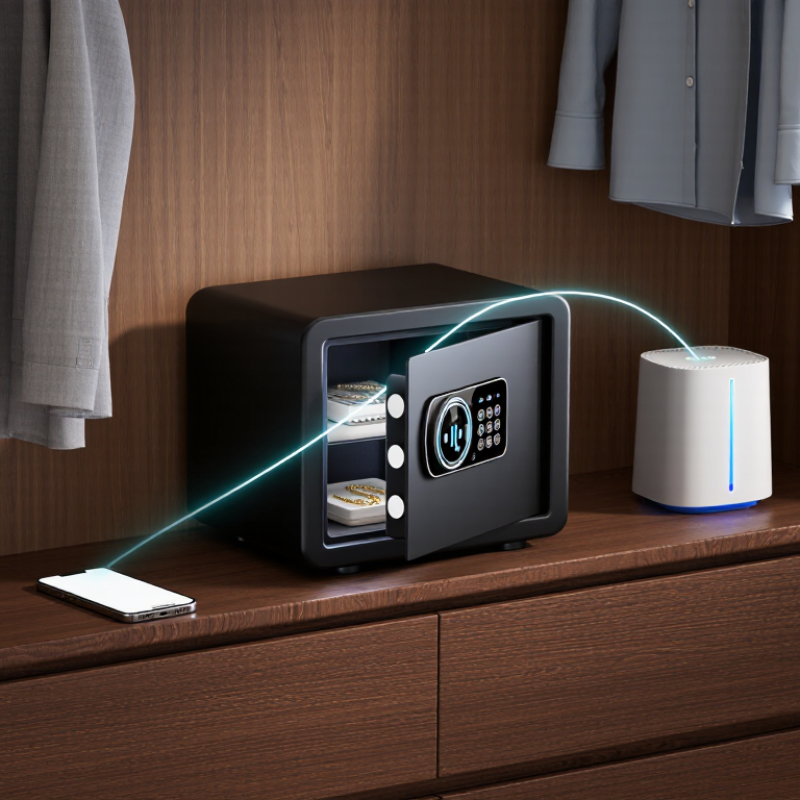
A WiFi smart safe combines a lockbox with electronic access controls and a wireless connection. Depending on the model, you may unlock it with a keypad, fingerprint reader, or phone app. Inside, a sensor and control board check the request, then release the locking mechanism if access is approved. Some models send alerts when the door opens or someone enters the wrong code.

Think of it as two locks. One is physical. The other is digital. A WiFi connection can let you check status or receive alerts remotely, but it does not make the safe invulnerable. The 2024 Data Breach Investigations Report found that 68% of breaches involved a non-malicious human element, a reminder that reused passwords and mistaken settings matter. NIST’s IoT cybersecurity baseline also identifies data protection and software updates as important device capabilities.

Convenience has limits. If the internet drops, remote alerts or app controls may stop working; keypad access may still function, depending on the design. Check how the safe handles power loss, account recovery, and updates before relying on it. A phone notification is useful. It is not proof of forced entry, and a smart lock does not replace a properly rated safe for fire or physical protection.

What a Wi-Fi Smart Safe Is and How It Works

A Wi-Fi smart safe combines a lockable safe with connected features such as app-based status checks, access controls, or alerts. The workflow below is illustrative: available functions and connection paths vary by model. The bars show sequence position, not measured time or performance.

Which Features Set WiFi Safes Apart from Traditional Safes

How to Know If a WiFi Smart Safe Is Worth It in 2026?

Which Features Set WiFi Safes Apart from Traditional Safes

A traditional safe protects valuables with a physical barrier and a key or keypad. A Wi-Fi model adds app alerts, access history, and sometimes temporary user codes. If someone opens the safe while you are away, a notification can reach your phone. That convenience is useful, but it does not make the safe impossible to tamper with. Wi-Fi outages, weak passwords, and low batteries can all interrupt access.

A connected safe is not automatically a safer safe.

The 2024 Verizon Data Breach Investigations Report found that 68% of breaches involved a non-malicious human element, such as errors or social engineering. That figure covers organizations, not smart safes, but it is a reminder to secure accounts and avoid sharing access casually. Look for two-factor authentication, clear access logs, and a dependable keypad or backup entry method.

Check how the safe behaves when your router is offline. Small details matter. Convenient, yes. Foolproof, no.

Tips: Before buying, test the app’s alerts and recovery process, and check battery warnings. Store recovery codes securely, not beside the safe. If you rarely need remote alerts, a well-built traditional safe may be the more sensible choice.

What Security, Privacy, and Reliability Risks to Assess

A WiFi smart safe is only as dependable as its lock, network, and account. Ask whether it encrypts data in transit, supports multifactor sign-in, and receives signed software updates. These are not extras. The 2024 Data Breach Investigations Report found stolen credentials involved in 24% of breaches it analyzed. That figure concerns organizations, not home safes, but it highlights why account security matters. Use a unique password, enable login alerts, and check whether the app shows who opened the safe and when.

Privacy deserves equal scrutiny. Find out what the app collects, how long it keeps access logs, and whether you can delete them. A small detail matters: does the safe still open with a keypad or backup key when WiFi fails? The 2024 Annual Outage Analysis reported that 54% of surveyed organizations’ most recent significant outages cost more than $100,000. Those figures are not household estimates; they show how disruptive outages can become. Test the safe with your router unplugged and its batteries partly depleted. A weekly test is mundane, but revealing. I would not treat a polished app screen as proof of reliability. Check update history, battery warnings, and the maker’s stated recovery process before storing anything you cannot afford to lose.

How to Compare Costs, Use Cases, and Alternatives in 2026

A WiFi smart safe is worth considering when you need remote alerts, activity records, or access for more than one trusted person. In 2026, compare its full cost with a basic keypad or mechanical safe. Include the purchase price, batteries, possible app fees, and any required network equipment. Convenience has a price. If you rarely open the safe, a connected model may add little value.

Match features to a real routine. A homeowner might appreciate an alert when a shared safe opens, while someone storing spare keys may prefer a simpler lock. Check what happens during a WiFi outage or power failure, and whether local access still works. Read the stated fire and water ratings carefully; digital features do not replace physical protection. Independent test details matter. I would also question whether activity logs are useful enough to justify another connected device.

Tips: Compare three options side by side: WiFi, keypad, and mechanical. Note total cost, access method, backup plan, and installation needs. Test the safe’s placement and signal before buying, especially in a basement or metal cabinet. Keep it simple. If alerts are your main reason, confirm they arrive reliably and can be managed without a paid plan. A lockbox may suit low-risk, everyday items, though it offers fewer protections.

How to Know If a WiFi Smart Safe Is Worth It in 2026? — How to Compare Costs, Use Cases, and Alternatives in 2026

Compare the convenience of remote alerts and access with total cost, connectivity limits, and the protection you actually need. Cost ranges below are indicative U.S. planning estimates in USD; prices and product features vary by size, security rating, and seller.

Option or factor Typical upfront cost Ongoing cost Best suited to Key advantages Limitations and checks Worth considering when…
WiFi-enabled smart safe About $150–$500 for many consumer models; larger or more security-focused models can cost more. Often $0 for basic app alerts; some services or connected features may require a subscription. People who want remote status alerts, shared access, or a record of safe activity. May send notifications when opened, support user access controls, and make it easier to check activity remotely. WiFi does not make a safe burglary-proof. Alerts depend on power, internet, app support, and correct setup. Check backup access, battery alerts, data practices, and subscription terms. Remote notifications or managing access for more than one authorized user solves a real, recurring need.
Non-connected electronic safe About $80–$300 for many home-use models, depending on size and construction. Usually none; batteries may need periodic replacement. Households wanting keypad access without app or internet features. Simple day-to-day access without WiFi setup or an online account. No remote status alerts. Verify that there is a dependable backup-entry method and that the safe can be securely anchored. You want electronic access but do not need to monitor the safe remotely.
Mechanical combination safe About $100–$400 for many compact home models; higher-security models can cost substantially more. Usually none; professional service may be needed if the combination is lost or the lock requires repair. People who prefer a non-electronic lock and can tolerate slower access. No app, network connection, or lock batteries are required. Combination entry may be slower, and recovery from a forgotten combination can be inconvenient. Security depends on the safe’s construction and installation. Reliability without electronics matters more than remote convenience.
Small lockbox or portable safe About $20–$100 for basic models; specialized designs may cost more. Usually none. Short-term organization or keeping small items out of casual reach. Low cost, compact size, and easy portability. Many portable boxes offer limited resistance to forced entry and can be carried away unless secured. They are not a substitute for a tested, anchored safe when stronger protection is needed. Your goal is basic organization or deterrence rather than high-value protection.
Separate door or room sensor About $20–$100 for a basic sensor setup; broader systems can cost more. May be free or subscription-based, depending on the service. People who mainly want an alert if a room or cabinet is accessed. Can add monitoring without replacing an existing safe; may cover more than one entry point. It may report access to the room or cabinet, not reliably identify who opened the safe. Placement, connectivity, and system compatibility matter. Alerts are the priority and a suitable safe is already in place.
Upfront cost comparison Compare the safe, delivery, mounting hardware, and any installation—not just the listed price. Include any required service plan in the first-year total. Anyone comparing connected and non-connected options. A complete estimate prevents a low advertised price from obscuring essential costs. Size, fire protection, tested security ratings, and anchoring can change the price considerably. Do not assume similarly priced models provide equal protection. You can compare models using the same capacity, protection needs, and installation assumptions.
Three-year ownership estimate Use the purchase price plus any delivery or installation charges. Formula: purchase and setup cost + 36 months of any monthly fee + expected battery or service costs. Buyers deciding whether connected features justify a premium. Shows how recurring fees affect the cost beyond the first year. Subscription prices and feature bundles can change. Confirm whether alerts, user management, and event history work without a paid plan. The connected model’s three-year total remains acceptable compared with a suitable alternative.
Connectivity and backup access May be included in the purchase price; network upgrades are separate if needed. Potential internet or service costs are usually part of the household’s existing plan. Homes with stable WiFi and users comfortable maintaining app access. Remote features can be convenient when the safe is away from the user. Check what happens during a WiFi outage, power loss, dead batteries, phone loss, or app-service disruption. The safe should still offer a clearly documented local access method. You understand which features stop working offline and have a practical backup plan.
Security and privacy review Not usually a separate line item, but may influence which model you choose. Review any fees tied to cloud storage, event history, or account features. Anyone storing sensitive documents, valuables, or access credentials. Connected controls may make it easier to manage authorized users and review activity. Look for clear update and account-recovery policies, strong account authentication, understandable privacy terms, and the ability to remove access for former users. The manufacturer’s support, data handling, and update commitments meet your expectations.
Overall decision Compare only options that fit the contents, capacity, and installation requirements. Use a realistic ownership period and include fees you are likely to keep paying. Households balancing convenience, cost, and protection. A feature-by-feature comparison helps separate useful connectivity from marketing extras. WiFi features do not replace suitable construction, anchoring, appropriate fire protection, or responsible access management. Choose WiFi if remote alerts or user management provide ongoing value; choose a simpler alternative if those features would rarely be used.

Cost ranges are broad estimates for comparison, not quotes or guarantees. Confirm current pricing, security testing or ratings, dimensions, warranty, installation requirements, and feature availability before purchase.

FAQS

How does a Wi-Fi safe differ from a traditional safe?

It can send phone alerts, record access history, and offer temporary user codes. A traditional safe usually relies on a key or keypad. Convenient, not foolproof.

Can a phone alert prove that a safe is secure?

No. Alerts can show that the safe was opened, but they do not prevent tampering. A strong physical lock still matters.

What should happen if the Wi-Fi connection fails?

Check whether the safe still opens with its keypad or backup key. Unplug your router and test access before storing important items.

How can I protect the safe’s app account?

Use a unique password and enable multifactor sign-in when available. Login alerts and clear access logs can help you notice unfamiliar activity.

What privacy details should I check?

Find out what information the app collects, how long it keeps access logs, and whether you can delete them. Small details matter.

How can I check battery reliability?

Test battery warnings and the recovery process. Also try the safe with partly depleted batteries. A warning you never test may not help much.

What should I test before buying a Wi-Fi safe?

Test app alerts, backup entry, and access when your router is offline. Review the update history and stated recovery steps, too.

Is a Wi-Fi safe worth it if I rarely need remote alerts?

Maybe not. A well-built traditional safe may be more sensible if you seldom use remote features. I would not trust an app alone.

Conclusion

A WiFi smart safe combines a secure storage compartment with wireless connectivity, allowing users to check its status or receive alerts through a connected device. Depending on the model, it may also offer access logs, remote notifications, multiple ways to unlock, and backup options for power or connectivity issues. These features can make everyday access and monitoring more convenient than with a traditional safe, but they do not automatically make the contents more secure.

Before deciding whether a connected safe is right for you, assess how it protects account data, handles software updates, and works when the internet or power is unavailable. Consider the purchase price, any ongoing fees, the value of remote access, and how often you will use the added features. Are smart safes with Wi-Fi worth the investment? They may be for people who value alerts and convenient monitoring, while a well-built traditional safe may better suit those who prefer simpler operation and fewer connected features.

Oliver

Oliver

Oliver is a seasoned marketing professional with a wealth of expertise in driving brand awareness and engagement. With a deep understanding of our company's product offerings, he consistently delivers high-quality content that enriches our professional blog. His insights not only shed light on......